
How I used AI to create a professional event video in four days.
A real-world AI video case study using ChatGPT, Claude, ElevenLabs, Pexels, AI video tools and CapCut — with no professional video-production background.
Produced by WhizOps and Dabotek.
I had four days to create a four-minute anniversary film. I had never made one before.
The video above was for the Johns Creek Chamber of Commerce’s 20th Anniversary and State of the Chamber event. It needed to tell 20 years of history, recognize the people and businesses behind the organization, and feel polished enough to play on a large screen in front of Chamber members, sponsors and community leaders.
My first thought was: how hard can this be with AI?
I had seen all those incredible demos online. Write one prompt. Generate a few clips. Suddenly you have something cinematic. I genuinely thought AI might do most of the work for me.
The first two days cured me of that idea.
Can you really create a professional AI video with one prompt?
Not in my experience.
What I expected was:
Prompt → Generate → Amazing video
What I actually experienced was:
Prompt → Generate → That’s not right → Rewrite → Generate again → Weird result → Change tools → Try another approach → Edit → Combine → Adjust → Try again
The demos online show you the beautiful result. They don’t show you the failed generations, the consistency problems, the prompt iterations, the editing, or all the other tools involved.
And I wasn’t making a cool 10-second AI clip. I needed a coherent four-minute film about a real organization, real history and real people.
Then I realized something even more important. Even if AI could generate the entire video, I shouldn’t let it.
The video needed to feel real
This wasn’t a fictional movie. It was a 20th anniversary. The entire point was connection. People should recognize their community. Their businesses. Their parks. Their events. Most importantly, their people.
I could generate a beautiful cinematic park with AI. But if that park doesn’t actually exist in Johns Creek, what does it mean to someone who lives there? I could generate business owners laughing together. But those aren’t the people who spent 20 years building this community.
That changed the question I was asking. Instead of how much of this video can I generate with AI? I started asking:
What needs to be real, and where can AI make the real story better?
That question changed the entire project.
Not one prompt. A system.
Brainstorming and creative direction
Before editing anything, I needed to figure out what I was actually making. I knew the requirements: four minutes, twenty years, large-screen projection, community, businesses, sponsors, history. But that’s a specification. It isn’t a story.
So I started talking to ChatGPT and Claude. I asked things like: how do I make a four-minute Chamber anniversary video feel cinematic instead of like a corporate slideshow? How should I balance 20 years of history, achievements, community, sponsors and the future? What should the audience feel in the first 15 seconds? Could this feel more like a movie trailer?
The obvious structure was something like 20 years → achievements → community → thank you → future. It made sense. But it felt predictable. Through multiple rounds of brainstorming I started thinking in terms of emotion instead:
Belief → Connection → Momentum → Gratitude → Legacy
This was my first important realization. AI was much more useful as a creative sparring partner than as a one-click creator. It could give me possibilities incredibly fast. I still had to decide which ones were good.
Writing the script
Once I had a direction, I needed language. I used AI to develop opening concepts, title cards, transitions, emotional beats, section sequencing and different versions of the narration.
Sometimes it gave me something I loved. One line that emerged during the process was:
“It started quietly. As most important things do.”
Other times it was terrible. Too cheesy. Too corporate. Too dramatic. Or obviously AI-written. Some of my most useful prompts were literally:
Too cheesy.
This sounds like AI.
Make it more understated.
Shorter.
We need emotion without becoming dramatic.
This doesn’t sound like the Chamber.
This taught me something I now think matters more as AI gets better. Generating 20 ideas is easy. Knowing which 19 to throw away is the hard part.
Organizing the real assets
Once I decided the film needed real people and real places, I started gathering everything I could. Historical photos. Event footage. Businesses. Parks. New construction. Leadership. Sponsors. Newspaper material. Statistics. Special-thank-you photos. Logos.
Soon I had another problem. I had a lot of assets, and finding the right one while editing was becoming its own job. So I used ChatGPT to help me think through an organizational structure for the footage.
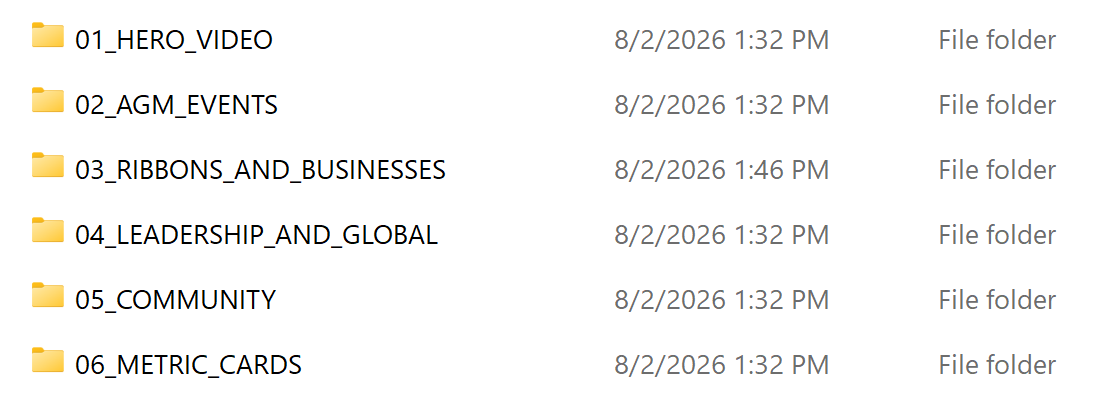
It sounds simple. But now, instead of searching randomly through hundreds of assets, I could think: I’m editing the community section — what do I have?
This became one of my favorite AI use cases from the project, because AI didn’t generate anything. It helped me think more systematically.
A failed experiment with AI-assisted coding
One of the most useful things I did was fail.
I wanted the opening to feel cinematic. At one point I thought: if Claude can code, why can’t I have AI build the opening? So I tried. I described what I wanted and experimented with an HTML/JavaScript animation.
Technically, the result was far more sophisticated than anything I could have coded myself from scratch. The prototype was built around a 1920×1080 composition and a timed cinematic opening. It included camera movement, particles, depth of field, motion blur, film grain, lighting effects, and a sequence designed to transform into the Chamber’s “20” anniversary mark.
It sounded great on paper. Then I watched it. It was boring. The movement felt too slow. The visuals felt too simplistic. Most importantly, it didn’t create the emotional impact I wanted.
This was an important failure. AI had successfully completed the technical task I gave it. The problem was that I had given it the wrong task. I was asking can AI build this? when I should have been asking is this actually the best way to create the experience I want?
I abandoned it. That probably saved me from spending another day polishing the wrong solution.
Finding the right tool instead of “the AI tool”
I also explored specialized AI video tools, including Runway and Hyperframe. At first I was searching for the AI video tool that would solve everything. Eventually I stopped. The better question became: what’s the best tool for this specific problem?
Sometimes that was an AI video generator. Sometimes the Chamber already had the exact photograph I needed. Sometimes I needed real footage from Johns Creek. Sometimes professionally shot footage from Pexels was faster and better than spending an hour generating a six-second clip. And sometimes I needed a traditional video editor, because precision mattered more than generation.
There’s also a cost nobody mentions when they show you the AI video demos. Every generation burns credits whether the clip is usable or not, and you will retry a lot. A few afternoons of “let me try one more prompt” adds up to more than you’d guess.
I wasn’t trying to make an AI video anymore. I was trying to make a good video.
Directing an AI voice with ElevenLabs
Voiceover was another area where I initially underestimated the work. I thought: script → generate voice → done. It wasn’t.
I used ElevenLabs for the narration, but choosing a voice was only the beginning. The voice needed to fit the film. I wanted something warm and cinematic, not a generic corporate narration. So I experimented.
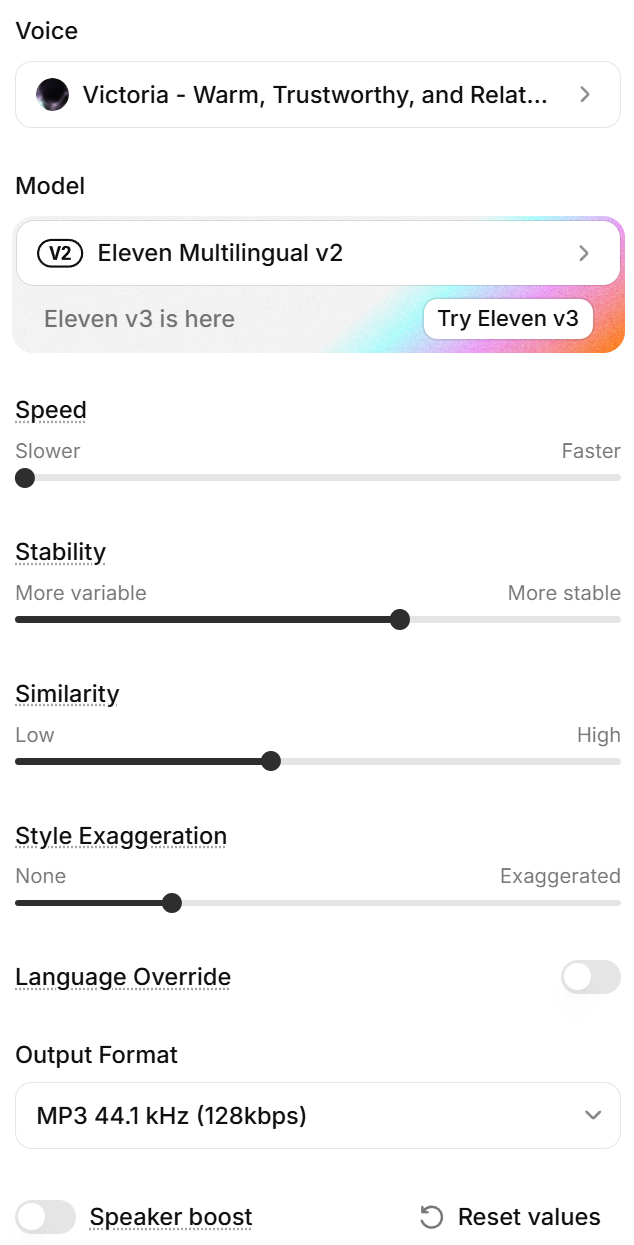
I changed the pace. I experimented with how stable or variable the delivery felt. I adjusted the style. Then I listened. Regenerated. Adjusted. Listened again.
My thinking became: slow this part down. This section needs more weight. This feels too flat. Give this more emotion, but not too much. Does the voice actually match what’s happening on screen?
That’s when I realized: generating a voice is easy. Directing the voice is the creative work.
Handling feedback and last-minute changes
Then came the real-world part: stakeholder feedback. The video was described as “superb.” But we weren’t done.
Additional changes came in close to the event. Awards needed to move. More statistics needed to appear. Additional footage needed to be incorporated. There were also related event materials and QR-code survey elements to handle.
And I discovered another AI use case that gets much less attention than image or video generation: complexity management. I could take feedback and turn it into:
Feedback → What does it affect? → What needs to change? → What stays untouched? → What’s next?
At this point AI wasn’t creating anything. It was helping me stay organized while the requirements changed.
By day four it looked nothing like day one.
There was no magic AI button. There was a system.
| Tool / resource | What I used it for |
|---|---|
| ChatGPT | Brainstorming, structure, scriptwriting, research, organization, troubleshooting, revisions |
| Claude | Creative exploration, writing, problem solving and coding experiments |
| Real Chamber assets | History, people, businesses, events, sponsors and authenticity |
| Real Johns Creek footage | Actual locations, parks, construction and community |
| Pexels | Professional stock footage where appropriate |
| ElevenLabs | AI narration and voice direction |
| Runway | Explored for generative video |
| Hyperframe | Explored for AI-assisted video and motion |
| HTML / JavaScript | Experimental coded motion graphics |
| CapCut | Assembly, timing, synchronization, editing and final production |
| Me | Deciding what belonged and what didn’t |
That last row became the most important one.
ChatGPT could give me ten scripts. Pexels could give me hundreds of clips. ElevenLabs could generate multiple performances. AI could write thousands of lines of animation code. But none of those tools knew what the Johns Creek Chamber’s 20th anniversary should feel like. That was still my job.
What I would do differently today
This may be my favorite part, because I would already do this project differently — and I only made it a few weeks ago.
My biggest mistake wasn’t choosing the wrong AI model. It was sometimes choosing a tool before completely defining the problem.
Today, I would start with:
Creative brief → Story → Storyboard → Asset inventory → Tool selection → Production → Rough-cut approval → Final edit
Especially the asset inventory. Before generating anything, I would ask: what do we already have? What must be real? What’s missing? Only then would I decide whether the missing piece should come from AI generation, stock footage, motion graphics, coding or somewhere else.
I’d also establish one source of truth for every approved photo, logo, statistic, name and video asset before production began. That alone would have saved me hours.
What this project changed about how I think about AI
I started this project asking: how can AI make this video for me? Four days later I was asking: how can I use AI to make a better video? Those sound similar. They’re completely different.
AI didn’t turn me into a filmmaker in four days. Instead, I encountered a problem I didn’t know how to solve. I asked questions. I learned enough to take the next step. Then I encountered another problem. I asked more questions. I tried something. It failed. I changed direction. And I repeated that process until I had something I could deliver.
Before generative AI, I might have looked at a project like this and thought: I don’t know video production, I need someone who does. Now I increasingly think: I don’t know how to do this yet — how much of that gap can I close with AI?
For me, that’s one of the most powerful applications of AI for small businesses. It’s not about replacing filmmakers, designers, developers, marketers or other specialists. It’s about dramatically reducing the distance between:
“I don’t know how.” and “I can figure this out.”
AI hasn’t just changed what I can create. It has changed the size of the problems I’m willing to attempt.
Twelve uses. Only three of them generative.
| # | Use | What it did |
|---|---|---|
| 01 | Brainstorming | Turning a vague assignment into a creative direction. |
| 02 | Research | Learning unfamiliar concepts while working. |
| 03 | Writing | Developing and criticizing the script. |
| 04 | Planning | Breaking an unfamiliar project into manageable steps. |
| 05 | Organization | Turning a pile of assets into a usable production library. |
| 06 | Coding generative | Prototyping an idea I couldn’t have built myself. |
| 07 | Evaluation | Recognizing when that prototype wasn’t good enough. |
| 08 | Voice generative | Creating and directing narration. |
| 09 | Generation generative | Experimenting with visuals when appropriate. |
| 10 | Troubleshooting | Solving problems as I encountered them. |
| 11 | Revision | Translating stakeholder feedback into actions. |
| 12 | Learning | Closing skill gaps fast enough to finish the project. |
The biggest surprise? The most valuable uses of AI weren’t always generative. Sometimes AI’s greatest value was simply helping me figure out what to do next.
About this project
Created for the Johns Creek Chamber of Commerce’s 20th Anniversary and State of the Chamber event. Produced by WhizOps and Dabotek.